Prerequisites
There are a few required prerequisites before being able to upload multiple documents:
- The host machine (i.e. desktop, notebook, etc.) must have Internet Explorer (not Microsoft Edge), and NOT Firefox, Safari, Google Chrome etc, and,
- Webcare need to be added as a trusted site,
- You must be signed in automatically when you log in.
1) Select Client on the main menu bar (what is menubar?). Once you are in clients, scroll down until you get to the client you want to upload the documents to. After this, select the documents by clicking on Documents. Selecting documents will bring up the list of all of the documents for this client.
2) Select Upload from the submenu bar ( what is a submenubar?). First, click on the arrow next to Upload (1), then select Upload Multiple Documents (2).

3) Either click on Browse for files.

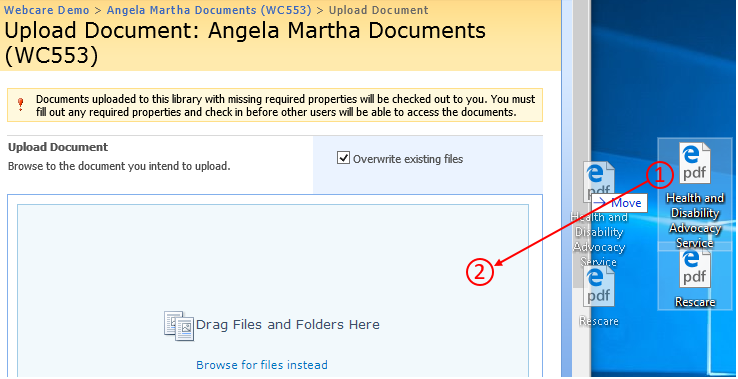
Or, "drag and drop" files. To drag and drop the files. Click on the files from where they are located, keep you finger on the mouse and let go once it is over the upload page.
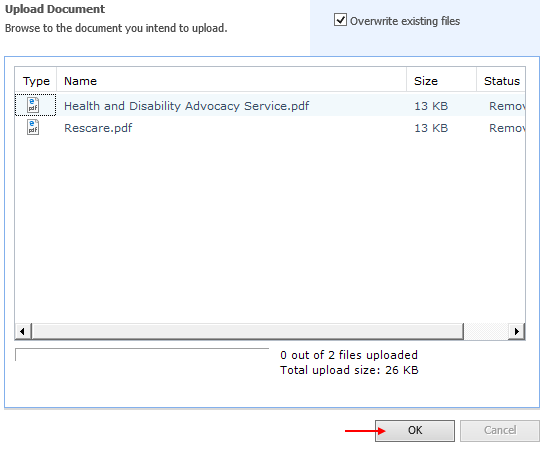
4) Once you have clicked browse for files, select the files you would like to upload and click "OK".